| Homework Submission Process |
- Submit homework solutions through myCourses.
- Your submission should be a single file that has your name as part of the file name.
- If the homework answer consists of only a single file (ex., a Pd patch), submit the file uncompressed (again, with your name as part of the file name).
- If the homework answer consists of more than one file, put the files in a single directory, making sure to number them in accordance with the homework questions, then "zip" the directory and submit it. Make sure your name is in the zipped file name.
"Collaboration Policy": Students can often learn a great deal from their peers. Feel free to seek help from other students (as well as the instructor and TA) when you are having difficulty. But DO NOT COPY assignments. We expect you to write your own patches and code.
Pd Patch Remarks: Design your interfaces in order to group the elements (i.e., buttons, displays, sliders) in an intuitive way. Verify the implementation of the patch so that default parameters are initialized at load time. Add small comments to help the user get started and to understand how the patch works. Test your patch (before delivering it) as if you were a real user that does not know anything about the way it has been implemented. For example, make a copy in another folder, quit Pd, reload the patch and test it. Design each patch in a small window that can be printed on one page only.
Wiring Code Remarks: Your Wiring (Arduino) programs should be easy to read and understand. At the top of each program, provide the program name, your name, and information about the program and how to use it. In your code, be liberal with comments. Even when a program does not execute properly, partial credit may be given based on comments that show good understanding of the issues and ways to approach the solutions.
| Homework #6 | Due: Tuesday, 17 March 2026 at 22:00 |
- Create a Pd patch that uses cycle~ objects to synthesize at least two different types of "bird-like" calls or songs. It should be possible to hear each type of bird call separately or all of them at once. [8 pts]
- Create a Pd patch that uses the noise~ object to synthesize the sound of wind. There should be at least three "spectral regions" to the sound (i.e., you should use at least three [reson~] objects with different parameters for each). You should provide controls for the "speed" (associated with the resonance center frequencies) and "variability" (associated to how much the center frequencies and/or Q factors should randomly vary) of the wind. [7 pts]
| Homework #5 | Due: Tuesday, 10 March 2026 at 22:00 |
- Create either an Arduino sketch that implements Steve Reich's Clapping Music via pseudo-MIDI output OR a Pd patch that implements the first section of Steve Reich's Piano Phase [15 pts].
If implementing Clapping Music, note that a clapping sound can be produced with note number 39 on channel 10 of a general MIDI synthesizer. The sketch should provide controls or variables for the number of repetitions for each measure, the tempo (in beats per minute) and the MIDI key velocity.
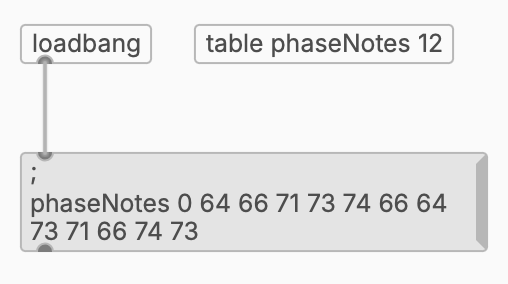
If implementing Piano Phase, the Pd patch should have controls for the durations of a sixteenth note in the two parts (default to 167 and 170 milliseconds), an "On/Off" switch, and a way to reset the piece to the beginning. You may want to use a [table] to hold the sequence MIDI note numbers, as shown below, together with a [tabread] object.
| Homework #4 | Due: Tuesday, 10 February 2026 at 22:00 |
- Reimplement your looping polyphonic MIDI sequence from Homework #2 (or create a new one) on the Arduino. The "MIDI" data should be sent out through a serial connection to a Pd patch (from which it should be routed to the internal DLS synthesizer of the computer). The MIDI sequencing must be done on the Arduino (message formatting and timing), not in Pd. Use the arduino2midi.pd Pd patch to receive the MIDI messages from the Arduino. Submit only the .ino Arduino sketch file. [10 pts]
| Homework #3 | Due: Thursday, 29 January 2026 at 22:00 |
- Create a Pd patch that implements a MIDI arpeggiator for notes below middle C (note number = 60). If a note below middle C is depressed, a four-note arpeggio (ex., fundamental, third, fifth, and octave) should repeat continuously until the note is released or another note below middle C is depressed (in which case the arpeggio should restart on the new note). Notes from middle C and above should play normally. Use the keyboard object in your patch but also allow the patch to work with an external MIDI source, such as VMPK. There should be a way to control the speed of arpeggiation. Provide at least three different chord types (major, minor, dominant 7th, etc.) and allow them to be selected by the user. [15 pts]
| Homework #2 | Due: Monday, 19 January 2026 at 22:00 |
- Read / scan CMJ articles on MIDI:
- Create a Pd patch that generates a looping polyphonic MIDI sequence of at least 4 "beats" (without using a sequencer object!). The patch should be designed to use the internal DLS synthesizer for sound output. The sequence should include drum and bass parts and at least one other voice of your choice doing "fills". The voices for each part should be specified using program change messages and initialized automatically when the patch is opened. A "start / stop" button should be provided for the sequence. [15 pts]
| Homework #1 | Due: Monday, 12 January 2026 at 22:00 |
- Read Dannenberg, "A Brief Survey of Music Representation Issues, Techniques, and Systems", Computer Music Journal, 17(3), pp. 20-30, 1993 and be prepared to be called upon in class on 13 January to briefly discuss some details of one particular representation issue (of your choice) covered in the paper.
- Create a Pd patch that implements a stop watch with 0.01 second accuracy (using only the objects demonstrated in the Week #1 notes). Provide a "Start/Stop" toggle and a "Reset" button. [5 pts]

| ©2003-2026 McGill University. All Rights Reserved.
Maintained by Gary P. Scavone.
|